Code Refactoring withAmazon Q Developer
 by Barış Emren
7 Ocak 202610 min read
by Barış Emren


Maintaining and improving code quality in modern software development is an ongoing challenge. As projects grow, technologies change, and teams evolve, refactoring existing code becomes inevitable. However, manual refactoring is both time-consuming and error-prone. This is where Amazon Q Developer comes into play.
As a cloud and software development company, we face constant pressure to deliver high-quality code quickly while maintaining security and scalability. Our decision to adopt Amazon Q Developer was driven by several key factors:
Our engineering team was spending significant time on repetitive tasks like code refactoring, security vulnerability scanning, and maintaining consistency across multiple projects. As our codebase grew and our team expanded, we needed a solution that could help us maintain code quality without sacrificing velocity.
Deep AWS Integration: Since we're heavily invested in the AWS ecosystem, having an AI assistant that understands AWS services and best practices was a natural fit. Q Developer provides context-aware suggestions for Lambda functions, API Gateway configurations, and other AWS resources we use daily.
Security-First Approach: In our industry, security isn't optional. Q Developer's built-in security scanning helps us catch vulnerabilities early in the development cycle, reducing the risk of security issues making it to production.
Developer Productivity: Our developers were spending too much time on boilerplate code and routine refactoring. Q Developer allows them to focus on solving business problems rather than wrestling with syntax and structure.
Consistency Across Teams: With multiple teams working on different services, maintaining code consistency was challenging. Q Developer helps enforce best practices and coding standards automatically, making code reviews more efficient.
Cost-Effective Scaling: As we scale our engineering team, onboarding new developers and maintaining code quality becomes more expensive. Q Developer accelerates onboarding by helping new team members understand existing code and follow established patterns.
Amazon Q Developer is an AI-powered code assistant developed by AWS. It helps developers with code writing, debugging, security vulnerability detection, and most importantly, code refactoring.
Core Capabilities:
Code completion and suggestions
Security vulnerability scanning
Code explanation and documentation
Automatic refactoring and code transformation
Optimized recommendations for AWS services
Usage Methods:
Extensions for IDEs like VSCode, IntelliJ IDEA, Visual Studio
Through AWS Console
Via Kiro CLI in terminal
To demonstrate the power of refactoring, we will refactor a simple React component. This is a scenario frequently encountered in the real world.
We have a simple React application. Here's an example component:
import React, { useState } from 'react'

function UserCard() {
  const [users, setUsers] = useState([])
  const [name, setName] = useState('')
  const [email, setEmail] = useState('')
  const [age, setAge] = useState('')
  const [error, setError] = useState('')

  // Bad: Magic numbers, repetitive validation, long function
  const addUser = () => {
    if (!name) {
      setError('Name is required!')
      setTimeout(() => setError(''), 3000)
      return
    }
    if (!email) {
      setError('Email is required!')
      setTimeout(() => setError(''), 3000)
      return
    }
    if (!email.includes('@')) {
      setError('Invalid email!')
      setTimeout(() => setError(''), 3000)
      return
    }
    if (!age) {
      setError('Age is required!')
      setTimeout(() => setError(''), 3000)
      return
    }
    if (age < 18 || age > 100) {
      setError('Age must be between 18 and 100!')
      setTimeout(() => setError(''), 3000)
      return
    }

    const newUser = {
      id: Math.random() * 1000000,
      name: name,
      email: email,
      age: parseInt(age)
    }
    setUsers([...users, newUser])
    setName('')
    setEmail('')
    setAge('')
    setError('')
  }

  return (
    <div>
      <h1>User Management</h1>

      {/* Bad: Inline styles, repetitive structure */}
      {error && (
        <div>
          {error}
        </div>
      )}

      <div>
         setName(e.target.value)}
          style={{ width: '100%', padding: '8px', marginBottom: '10px', border: '1px solid #ddd', borderRadius: '4px' }}
        />
         setEmail(e.target.value)}
          style={{ width: '100%', padding: '8px', marginBottom: '10px', border: '1px solid #ddd', borderRadius: '4px' }}
        />
         setAge(e.target.value)}
          style={{ width: '100%', padding: '8px', marginBottom: '10px', border: '1px solid #ddd', borderRadius: '4px' }}
        />

          Add User

      </div>

      {/* Bad: Inline calculations, repetitive styling */}
      <div>
        <h2>
          Users ({users.length}) - Average Age: {users.length > 0 ? Math.round(users.reduce((sum, u) => sum + u.age, 0) / users.length) : 0}
        </h2>
        {users.map((user) => (
          <div>= 65 ? '#fff3e0' : user.age <= 25 ? '#e8f5e9' : 'white',
              border: user.age >= 65 ? '2px solid #ff9800' : user.age <= 25 ? '2px solid #4CAF50' : '1px solid #ddd',
              borderRadius: '8px'
            }}
          >
            <h3>{user.name}</h3>
            <p>{user.email}</p>
            <p>= 65 ? '#e65100' : user.age <= 25 ? '#2e7d32' : '#333' }}>
              Age: {user.age} {user.age >= 65 ? '(Senior)' : user.age <= 25 ? '(Young)' : '(Adult)'}
            </p>
          </div>
        ))}
      </div>
    </div>
  )
}

export default UserCard
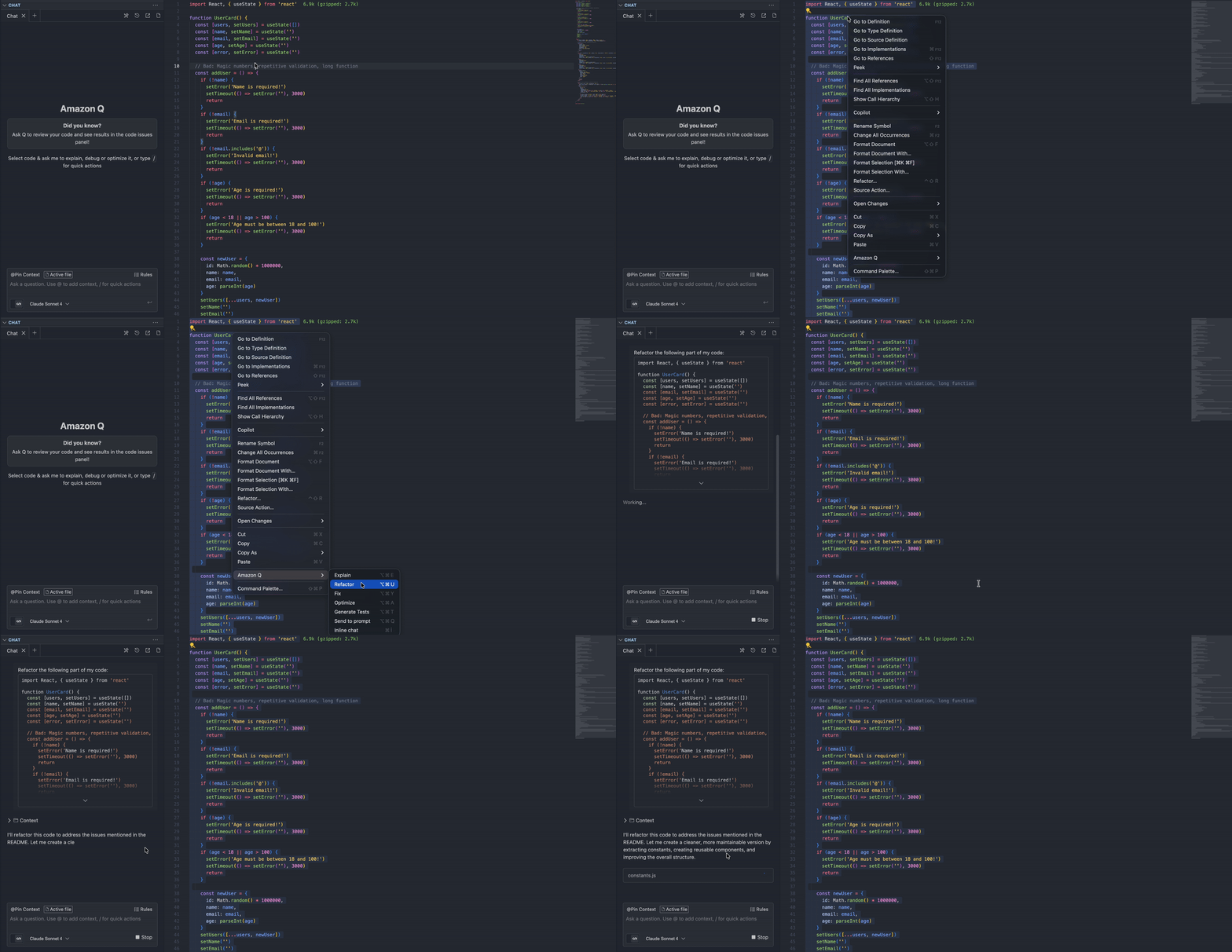
Open the code in VSCode (or other supported IDE) and select all code.
Right-click and select "Amazon Q > Refactor".
Wait for the Q Developer to edit the code. You may need to grant permission for terminal commands when necessary.
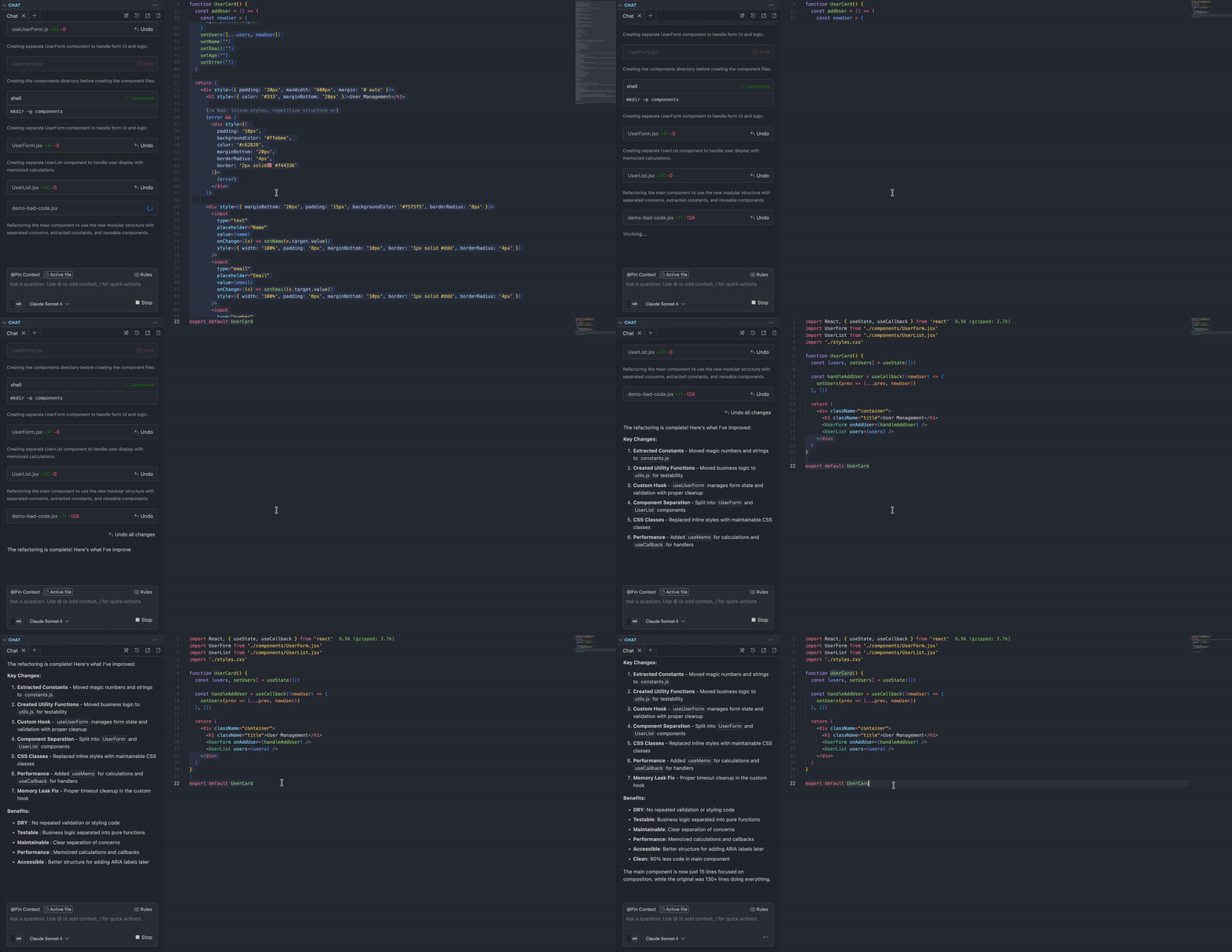
Constants have been moved to the constants.js file.
Moved business logic to utils.js for testability
useUserForm manages form state and validation with proper cleanup
Replaced inline styles with maintainable CSS classes
Added useMemo for calculations and useCallback for handlers
DRY: No repeated validation or styling code
Testable: Business logic separated into pure functions
Maintainable: Clear separation of concerns
Performance: Memoized calculations and callbacks
Clean: 90% less code in main component
There are two main ways to use Amazon Q Developer: VSCode Extension and Kiro CLI. Both have their strengths.
When to use:
While actively writing code during development
When you want visual feedback and diff view
When doing file or project-based refactoring
When you want inline suggestions and autocomplete
When working iteratively on code
Advantages:
Visual and interactive
Ability to see changes before accepting them
IDE integration (debugging, git, etc.)
Low learning curve
When to use:
If you prefer terminal workflow
When you need automation and scripting
When you want to integrate into CI/CD pipelines
When working with AWS resources
For batch operations
Example usage:
# Code analysis with Kiro CLI
kiro-cli chat "Create a plan to convert all JavaScript files in this project to TypeScript"


# Working with AWS resources
kiro-cli chat "Analyze my Lambda functions and suggest performance improvements"
Feature | Extension | Kiro CLI |
Visual Interface |
|
|
Automation |
|
|
IDE Integration |
|
|
CI/CD Pipeline |
|
|
AWS Resource Management |
|
|
Learning Ease |
|
|
Batch Operations |
|
|
Things to consider when refactoring:
1. Test Coverage First
Always write tests before refactoring
Ensure tests pass after changes
Don't blindly accept Q Developer's suggestions
2. Incremental Approach
Don't try to convert the entire project at once
Progress module by module, file by file
Commit at each step
3. Code Review Process
Always review AI suggestions
Conduct reviews with team members
Check edge cases
4. Maximum Efficiency from Q Developer
Use specific prompts
Provide context (which framework, which pattern)
Request multiple suggestions and compare
5. Security and Performance
Consider Q Developer's security recommendations
Evaluate performance implications
Test in staging before going to production
As a cloud and software development company, we've integrated Q Developer into several key areas of our workflow:
Our legacy codebases require continuous modernization. Q Developer helps us refactor old code patterns into modern, maintainable structures without the risk of introducing bugs. This is particularly valuable when migrating from older frameworks or updating deprecated dependencies.
Security is paramount in our work. Q Developer's real-time security scanning catches potential vulnerabilities as we write code, allowing us to address issues immediately rather than discovering them during security audits or, worse, in production.
We build and maintain numerous AWS-based applications. Q Developer provides intelligent suggestions for optimizing Lambda functions, improving API Gateway configurations, and following AWS best practices. This helps us reduce costs and improve performance across our infrastructure.
When working with complex systems or onboarding new team members, Q Developer helps generate clear documentation and explains existing code. This accelerates knowledge transfer and reduces the time senior developers spend explaining code to junior team members.
From auto-completing boilerplate code to suggesting entire function implementations, Q Developer reduces the time developers spend on routine coding tasks. This allows our team to focus on architectural decisions and business logic rather than syntax and structure.
Amazon Q Developer significantly accelerates and simplifies the refactoring process in modern software development. It can adapt to different workflows with both VSCode extension and Kiro CLI. When used correctly, it can significantly reduce development time while improving code quality.
The important thing is to apply AI suggestions with understanding and testing, rather than blindly accepting them. This way, you continue learning while producing higher quality code. As we saw in our JavaScript to TypeScript migration example, it doesn't just perform conversion but also suggests improvements that enhance code quality.
AI-powered refactoring is much faster and safer than manual work
VSCode Extension is ideal for interactive work
Kiro CLI is powerful for automation and AWS integration
Both tools are valuable in different scenarios
Daily development: VSCode Extension
Automation and CI/CD: Kiro CLI
AWS resource management: Kiro CLI
Learning and experimentation: VSCode Extension
As we continue to mature our use of Q Developer, we have several initiatives planned:
CI/CD Pipeline Integration: We're working on integrating Q Developer into our continuous integration and deployment pipelines. This will enable automated code quality checks, security scans, and refactoring suggestions as part of our build process, catching issues even earlier in the development lifecycle.
Prompt Engineering Excellence: We've realized that the quality of suggestions from Q Developer heavily depends on how we interact with it. We're investing in training our team on effective prompt engineering techniques to get more precise and contextually relevant suggestions. This includes creating internal guidelines and best practices for crafting prompts that yield optimal results.
Expanding Use Cases: While we've started with code refactoring and security scanning, we're exploring additional use cases such as automated test generation, API documentation generation, and infrastructure-as-code optimization. The goal is to leverage Q Developer across the entire software development lifecycle.
Team-Wide Adoption and Standardization: We're working on establishing company-wide standards for Q Developer usage, including when to use the VSCode extension versus the CLI, how to review AI-generated suggestions, and how to incorporate Q Developer into our code review process.
Measuring Impact: We're implementing metrics to quantify the impact of Q Developer on our development velocity, code quality, and developer satisfaction. This data will help us optimize our usage.
Amazon Q Developer has become an integral part of our development workflow. It's not just a tool for code completion—it's a comprehensive AI assistant that helps us maintain high code quality, improve security, and accelerate development velocity.
The key to success with Q Developer is treating it as a collaborative partner rather than a replacement for developer expertise. The best results come from combining AI suggestions with human judgment, thorough testing, and proper code review processes.
If you haven't tried Amazon Q Developer yet, definitely use it for your next refactoring need. Start small, experiment with different use cases, and gradually integrate it into your workflow. You'll save time and improve your code quality.

Ready to refactor and modernize your codebase faster? Contact Sufle today to start using Amazon Q Developer and accelerate secure, high-quality code refactoring across your projects.

Barış is an AWS certified developer with a passion for cutting-edge technologies. He always follows creative solutions by combining the newest cloud services and stacks.
Check out our latest updates and articles on our usage of technology, solutions and guidances.
We use cookies to offer you a better experience.