AWS Cost Optimization: 7 Proven Ways to Lower Your Cloud Bill
 by Erdi Aslan
10 Eylül 20267 min read
by Erdi Aslan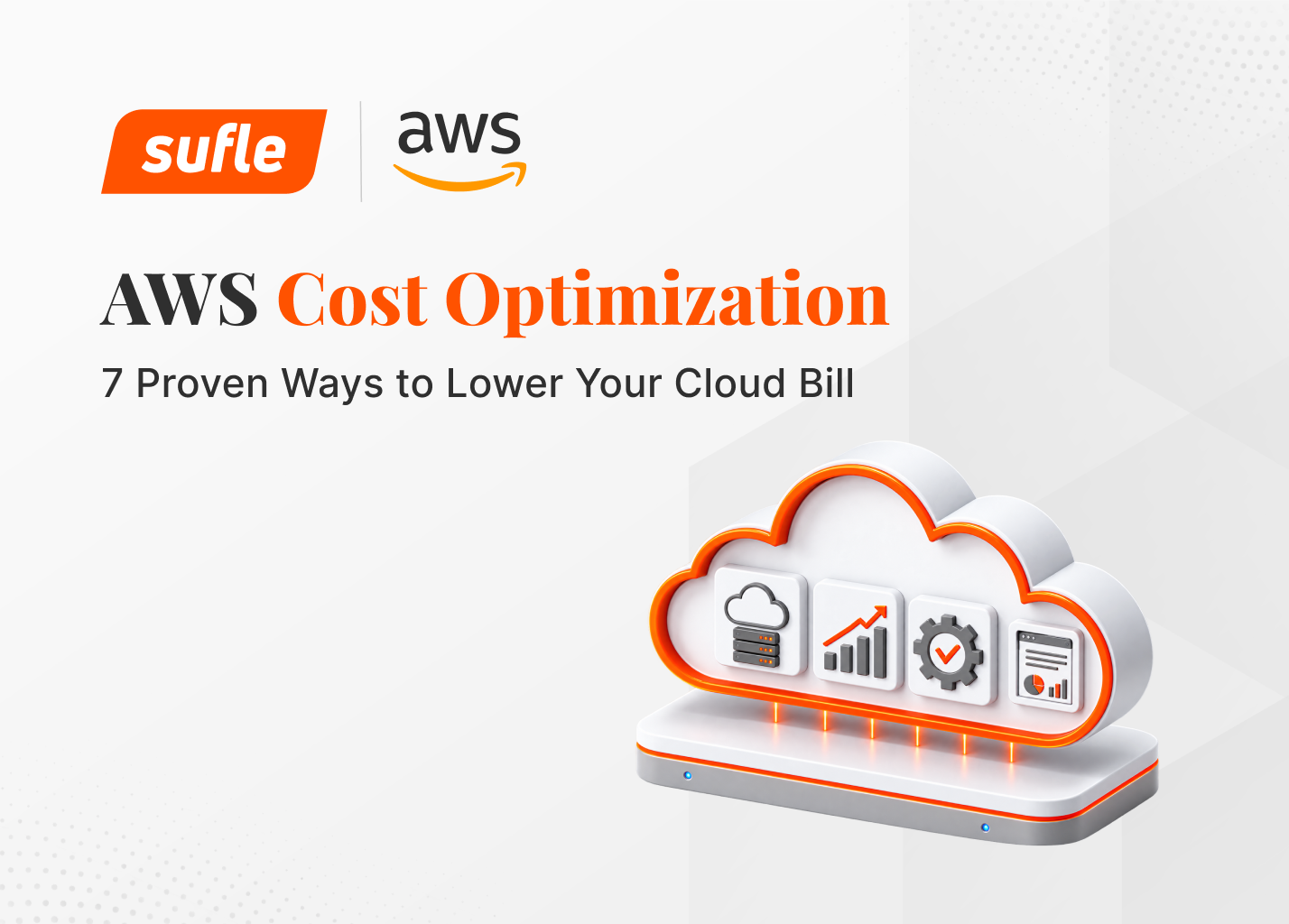


Is your AWS bill rising due to a complexity that’s becoming a little harder to see each month? This is a very common situation. On AWS, costs often don’t rise because of a single expensive service; they increase due to mis-sized resources, environments left running unnecessarily, incorrect storage class selections, and spending lines with poor visibility.
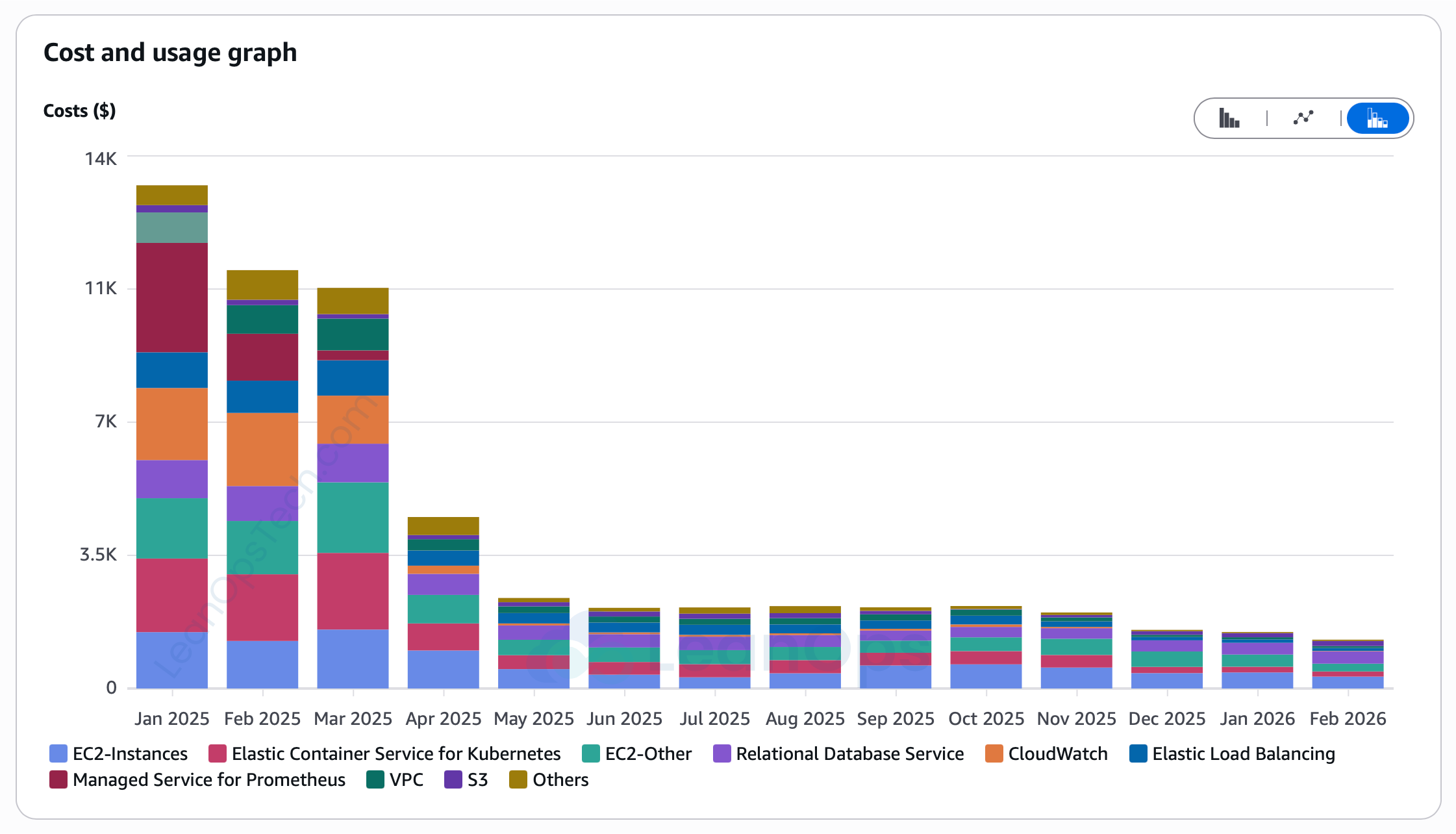
Image 1: Chart highlights a successful AWS cost reduction trend observed
The best starting point for AWS cost optimization is usually rightsizing. If you commit to a Savings Plan on an oversized instance, you're just locking in waste for 1–3 years. Get the size right first, then look at discounts. Rightsizing means checking whether your resources actually need the CPU, memory, and network capacity you're paying for. It's not about picking the cheapest option and it's about cutting what you're not using without hurting performance.
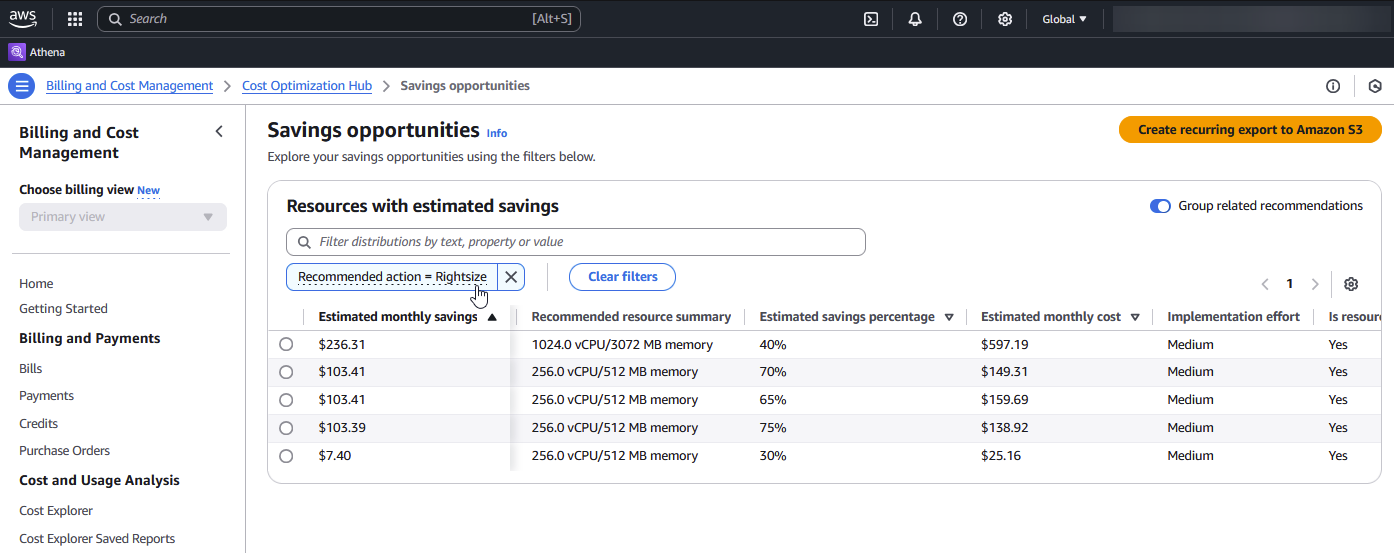
Image 2: Recommendations to improve instance maximize potential cost savings
Many teams oversize their instances because they are wary of production risks.
Temporary needs in development and test environments can turn into permanent capacity over time.
A resource size that was appropriate when the application was first deployed may become inappropriate over time as traffic patterns and architectures evolve.
One of the most costly mistakes in cost optimization is committing to a one- or three-year term contracts for capacity that is no longer needed.
Cost Explorer looks at the last 14 days of CloudWatch data, including peak CPU utilization, memory usage (if the CloudWatch agent is enabled), network activity, and disk I/O. Its recommendations are intentionally conservative to help avoid downsizing resources in a way that could negatively affect application performance.
Once you have rightsized your resources, the next step is to consider discounted pricing models for consistent usage. AWS offers two main options: Savings Plans and Reserved Instances.
Compute Savings Plans: Offer savings of up to 66% compared with On-Demand pricing and apply to eligible EC2, AWS Fargate, and AWS Lambda usage.
EC2 Instance Savings Plans: Offer savings of up to 72% compared with On-Demand pricing and apply to a specific EC2 instance family within a selected AWS Region.
Standard Reserved Instances: Offer discounts of up to 72%. They provide some of the highest potential discounts but offer limited flexibility.
Convertible Reserved Instances: Offer discounts of up to 66%. They provide greater flexibility for certain configuration changes but require more active management.
Scenerio | Recommended model |
The instance family may change over time | Compute Savings Plans |
AWS Fargate or AWS Lambda is used alongside Amazon EC2 | Compute Savings Plans |
Usage is predictable and stable within the same instance family | EC2 Instance Savings Plans |
Capacity reservation or a highly stable architecture is required | Standard Reserved Instances |
The configuration may change over time, but Reserved Instances will still be used | Convertible Reserved Instances |
Amazon EC2 Spot Instances allow you to use spare EC2 capacity at discounts of up to 90% compared with On-Demand pricing. In exchange, AWS may reclaim these instances when the capacity is needed elsewhere
In most cases, AWS provides a two-minute interruption notice before reclaiming a Spot Instance. This notice can be delivered through Amazon EventBridge and the instance metadata service. However, when hibernation is enabled, the interruption process may begin immediately, and the standard two-minute notice period may not apply.
What types of workloads are Spot Instance suitable for?
Batch processing
CI/CD runners
Video processing and media pipelines
HPC and distributed analytics jobs
Container-based fault-tolerant services
Machine learning training jobs
Test environments
Maintain flexibility across multiple instance types and Availability Zones.
Use attribute-based instance type selection when appropriate.
Manage capacity with an EC2 Auto Scaling group or EC2 Fleet.
Use the price-capacity-optimized allocation strategy.
Process interruption notices through Amazon EventBridge or the instance metadata service.
Although storage costs may not be as visible as compute costs on cloud bills, they can add up significantly over time. In particular, old logs, backups, media files, data lakes, and previous versions of objects can unnecessarily inflate S3 costs.
AWS offers two powerful features in this area:
S3 Intelligent-Tiering
S3 Lifecycle
Intelligent-Tiering is better suited to the following scenarios:
Access patterns are unpredictable.
Frequently and infrequently accessed data is stored in the same bucket.
Operational simplicity is a priority.
S3 Lifecycle is better suited for these scenarios:
The data lifecycle is clear
Regulatory and retention requirements are clearly defined.
Specific types of objects must be archived or deleted within a defined time frame.
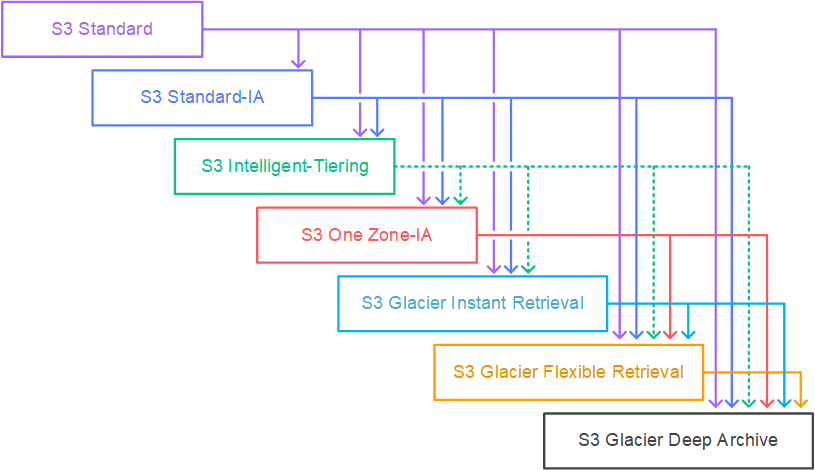
Image 3: diagram maps the available S3 storage classes to support cost reduce
Development and staging environments often run 24/7, even when teams use them for only 8–10 hours a day. This can lead to significant unnecessary spending overnight and on weekends.Instance Scheduler on AWS can automatically start and stop Amazon EC2 and Amazon RDS resources according to a defined schedule. With a relatively simple setup, it can reduce non-production costs by up to 70%.
The solution starts and stops resources according to predefined schedules, using tags and scheduling configurations. According to the current documentation, it supports the following resources:
Amazon EC2
EC2 Auto Scaling Groups
Amazon RDS
Amazon Aurora clusters
Amazon DocumentDB
Amazon Neptune
Cost optimization is not a one-time activity. As AWS environments continuously evolve, visibility and analytics tools should be used regularly. Several AWS tools can work together to support this process:
AWS Trusted Advisor helps identify cost optimization opportunities, including underutilized resources, unattached Amazon EBS volumes, idle Elastic IP addresses, and similar sources of unnecessary spending.
AWS Budgets
AWS Budgets allows you to:
Create monthly or recurring budgets.
Set alerts based on actual or forecasted spending.
Send notifications through email or Amazon SNS.
AWS Cost Anomaly Detection uses machine learning to identify unusual spending patterns.
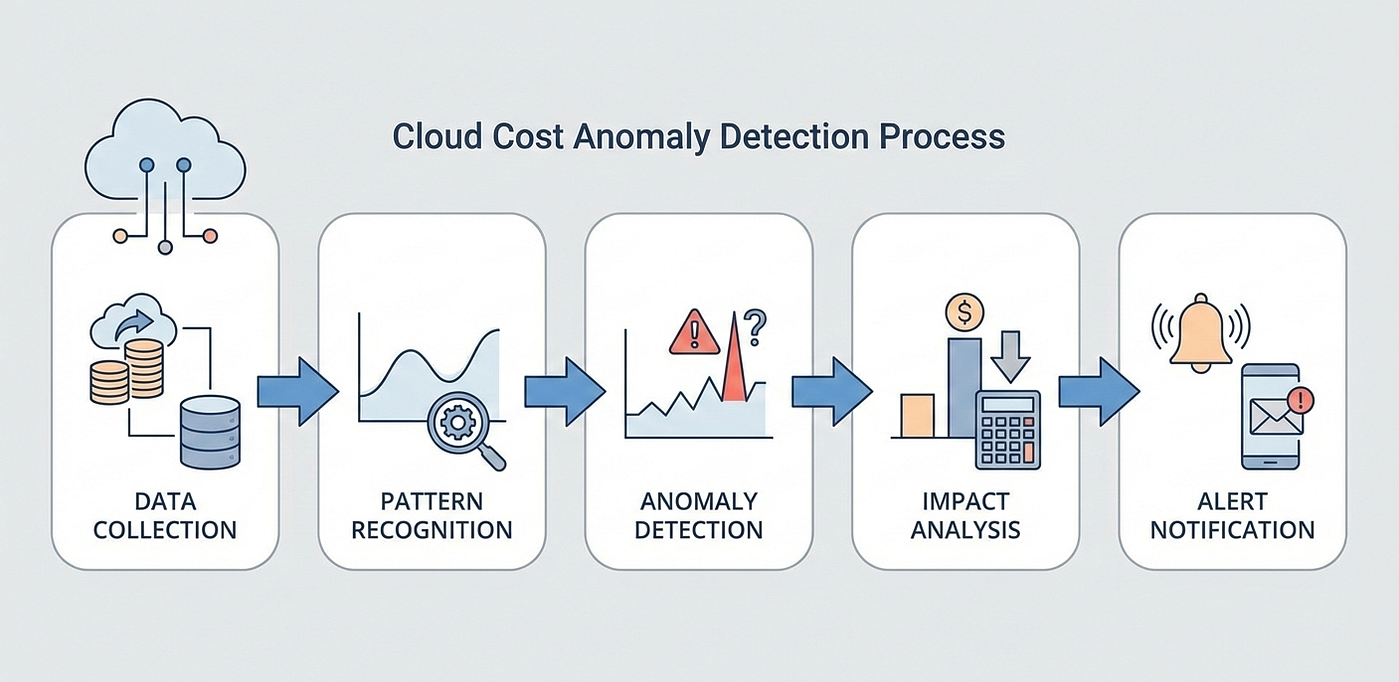
Image 4. The diagram illustrates the automated, end-to-end cloud cost anomaly detection process.
One of the most challenging aspects of reducing cloud costs is organizational rather than technical. Without clear visibility into which team, product, environment, or cost center is generating the costs, achieving sustainable optimization becomes difficult.
According to the AWS Billing documentation, user-defined tags must be activated as cost allocation tags before they can appear in cost reports. Additionally:
New tag keys may take up to 24 hours to appear in the console.
The activation may take an additional 24 hours to take effect.
Solution: Where to Start?
AWS cost optimization is not a one-time task, but an ongoing operational discipline. The best results come from taking small, systematic steps in the right order rather than relying on a single solution. If you want to get started today, here’s a sensible 30-day plan:
Use AWS Cost Explorer to review spending from the previous three months by service, account, and tag.
Identify the highest-cost Amazon EC2 workloads for rightsizing, and review insights from AWS Cost Explorer and AWS Compute Optimizer together.
Identify idle or underutilized non-production resources, and schedule or shut them down where possible.
Review opportunities to use Amazon S3 Intelligent-Tiering and S3 Lifecycle in your S3 buckets.
Evaluate Savings Plans and, where appropriate, Reserved Instances for stable baseline usage—but only after rightsizing.
Set up proactive alerts using AWS Budgets and AWS Cost Anomaly Detection.
Standardize tagging and cost allocation practices to maintain long-term visibility.
Building a sustainable AWS cost optimization strategy requires continuous visibility, the right technical decisions, and regular review. Sufle’s AWS experts can help you assess your current environment, identify optimization opportunities, and create a roadmap aligned with your business and technical requirements.

Looking to manage your AWS costs with a more visible, efficient, and sustainable approach? Contact Sufle to evaluate your current environment and identify optimization opportunities with our AWS experts.

Erdi is an Electrical and Electronics Engineer and a Cloud & Platform Engineer with multiple AWS certifications. He specializes in AWS, Terraform/Terragrunt, CI/CD, observability, automation, and cloud infrastructure. With hands-on experience in migrations, containerized workloads, monitoring, and cost optimization, he focuses on building scalable, reliable, and maintainable systems while continuously expanding his expertise in cloud technologies.
Check out our latest updates and articles on our usage of technology, solutions and guidances.
We use cookies to offer you a better experience.